How to Read Genesis/Southwire Cable Part Numbers: A Complete Guide by Bridge Cable
Understanding Genesis/Southwire cable part numbers is essential for contractors, installers, IT managers, and procurement teams working with low-voltage and structured cabling systems. Many professionals see a long series of letters and numbers printed on a cable spool or product label and are unsure what each identifier means. However, Genesis/Southwire cable part numbers are designed to provide important details about the cable’s construction, rating, shielding, and application.

The Southwire company logo displayed on the exterior of a modern commercial manufacturing and distribution facility.
At Bridge Cable, we help customers simplify cable selection for commercial buildings, security systems, data centers, and structured cabling projects. This guide explains how Genesis/Southwire cable part numbers work so you can choose the right cable for every installation.
Why Genesis/Southwire Cable Part Numbers Matter
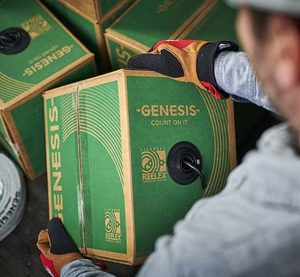
A technician handles Genesis cable reel boxes designed for efficient low-voltage and structured cabling installations.
Genesis/Southwire cable part numbers are more than just inventory codes. They help installers quickly identify cable specifications without opening product sheets or technical documentation. A properly understood part number can tell you:
- Cable type
- Number of conductors
- Wire gauge
- Shielding type
- Fire rating
- Jacket material
- Intended application
When you understand Genesis/Southwire cable part numbers, you reduce installation mistakes, improve code compliance, and speed up purchasing decisions.
Common Structure of Genesis/Southwire Cable Part Numbers
Most Genesis/Southwire cable part numbers follow a structured format. While exact numbering can vary depending on the cable family, the part number typically contains information related to:
- Product series
- Conductor count
- AWG size
- Shielding
- Jacket rating
- Packaging type
For example, a typical Genesis/Southwire cable part number may look something like this:
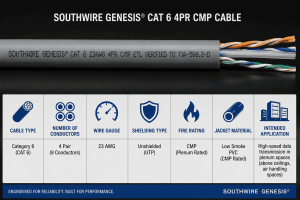
An illustrated guide showing how to read Southwire Genesis CAT6 cable specifications, including conductor count, wire gauge, shielding, CMP fire rating, jacket material, and intended application.
18/2 CMP SHIELDED
This format provides several important details:
- 18 = 18 AWG wire size
- 2 = Two conductors
- CMP = Plenum-rated cable
- Shielded = Includes shielding for EMI protection
Understanding Genesis/Southwire cable part numbers like this allows contractors to match cable specifications with project requirements.
Understanding Wire Gauge in Genesis/Southwire Cable Part Numbers
One of the most important sections of Genesis/Southwire cable part numbers is the wire gauge. AWG stands for American Wire Gauge, and it determines conductor thickness.
Common sizes include:
- 22 AWG for security and alarm systems
- 18 AWG for access control and low-voltage power
- 16 AWG for higher current applications
- 14 AWG for heavier-duty installations
In Genesis/Southwire cable part numbers, the AWG size usually appears first. Smaller AWG numbers indicate thicker conductors capable of carrying more power.
Choosing the correct AWG size is important for voltage drop prevention and long-distance performance.
How to Identify Conductor Counts
Genesis/Southwire cable part numbers also specify conductor count. This tells you how many insulated wires are inside the cable jacket.
Examples include:
- 2 conductor cable
- 4 conductor cable
- 6 conductor cable
- 8 conductor cable
For example:
- 18/2 = 18 AWG with 2 conductors
- 22/4 = 22 AWG with 4 conductors
Understanding conductor counts within Genesis/Southwire cable part numbers helps installers select the correct cable for security systems, audio systems, access control devices, and structured cabling installations.
Fire Ratings Found in Genesis/Southwire Cable Part Numbers
Fire ratings are another critical element in Genesis/Southwire cable part numbers. These ratings determine where the cable can legally and safely be installed.
Common ratings include:
CMP – Plenum Rated: CMP cables are designed for air-handling spaces such as ceilings and HVAC return areas. These cables produce less smoke during a fire.
CMR – Riser Rated: CMR cables are intended for vertical runs between building floors.
CM – General Purpose: CM cables are suitable for standard low-voltage installations where plenum or riser ratings are not required.
Recognizing these identifiers in Genesis/Southwire cable part numbers ensures NEC compliance and safer installations.
Shielding Identifiers in Genesis/Southwire Cable Part Numbers
Shielding protects low-voltage cables from electromagnetic interference (EMI) and radio frequency interference (RFI).
Genesis/Southwire cable part numbers may include terms such as:
- Shielded
- Foil shield
- Braided shield
- STP (Shielded Twisted Pair)
Shielded cable is commonly used in environments with electrical equipment, industrial machinery, or high-interference areas.
Bridge Cable often recommends shielded solutions for facilities where signal integrity is critical.
Jacket Types and Environmental Protection
Another feature included in Genesis/Southwire cable part numbers is the cable jacket type.
Examples include:
- PVC jacket
- LSZH (Low Smoke Zero Halogen)
- Outdoor-rated jacket
- UV-resistant jacket
Outdoor or direct burial cables typically include weather-resistant materials to protect against moisture and sunlight exposure.
Understanding jacket specifications within Genesis/Southwire cable part numbers helps ensure long-term cable durability and performance.
How Bridge Cable Helps Customers Select the Right Cable
At Bridge Cable, we understand that reading Genesis/Southwire cable part numbers can sometimes feel confusing, especially for large-scale projects involving multiple cable types.
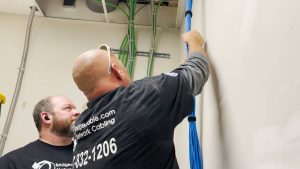
Bridge Cable technicians organize and route structured network cabling during a commercial low-voltage installation project.
Our team helps customers:
- Identify the correct low-voltage cable
- Match cable specifications to project requirements
- Select compliant structured cabling products
- Improve installation efficiency
- Reduce ordering mistakes
Whether you need plenum cable for commercial buildings, shielded cable for industrial environments, or structured cabling for data networks, Bridge Cable can help simplify the selection process.
Learning how to interpret Genesis/Southwire cable part numbers can significantly improve purchasing accuracy, installation quality, and project efficiency. From conductor counts and wire gauge to shielding and fire ratings, each section of the part number provides valuable information.
By understanding Genesis/Southwire cable part numbers, contractors and IT professionals can confidently select cables that meet both performance and code requirements.
Bridge Cable is committed to helping customers navigate structured cabling solutions with confidence. If you need assistance selecting the right Genesis or Southwire cable for your next project, our team is ready to help.
For more structured cabling insights, installation guidance, and low-voltage solutions, contact Bridge Cable today.
For help with any project or installation in the New Jersey or Philadelphia area please call us at 877-832-1206.
For more ideas please visit – https://www.bridgecable.com/services/
For more information and educational content please visit:
https://www.youtube.com/@BridgeCable
Copyright © 2026 Bridge Cable. All rights reserved.
Mailing: 2745 Terwood Road, Willow Grove, PA 19090
Warehouse: 2066 W. Hunting Park Ave, STE 308, Philadelphia, PA 19140
Related Posts
Why Businesses Spend More on Repairs Than Proper Structured Cabling Installation

Allentown Structured Cabling Companies: Preparing Networks for Growth