How Do You Choose the Right REX Devices?
Every door in a secured building has two jobs: keep the wrong people out, and let the right people leave without a fight. That second job belongs to REX devices. If you’re specifying or upgrading an access control system, picking the correct REX devices for each opening is one of those decisions that looks minor on a spec sheet but causes real headaches — false alarms, code violations, or trapped occupants — when it’s rushed.
What Is a REX Device?
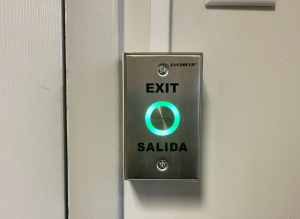
A touchless REX button signals the access control panel the moment someone waves to exit — no card, code, or physical button press required.
A Request-to-Exit (REX) device is a sensor or switch that tells the access control panel someone is leaving through a controlled door via an authorized, expected path — not a forced or propped opening. When a REX device activates, the system unlocks the door (if it’s electrically locked) and suppresses the door-forced or door-held alarm for that exit, so nobody gets a false alert every time a legitimate employee walks out. Choosing the wrong REX devices for a given door type is one of the most common causes of nuisance alarms in commercial access control installations.
Common Types of REX Devices
Not all REX devices work the same way, and the right choice depends heavily on the door, the traffic pattern, and your life safety requirements.
- Motion sensor (PIR) REX devices mount above or beside the door and detect movement toward the exit. They’re popular because no physical contact is required, which supports free-egress code requirements, but they can be prone to false triggers from nearby traffic if not aimed and calibrated carefully.
- Push-button REX devices are simple, low-cost, and highly reliable, but they require the person leaving to actively press a button — something that doesn’t satisfy free-egress requirements on many fire-rated or life-safety doors.
- Mechanical or mullion-mounted REX devices, often built into panic hardware or exit devices, mechanically signal the panel the instant someone pushes the bar to leave. These tend to be the most tamper-resistant option for high-security exits.
- Credential-based or dual-technology REX devices combine a motion sensor with a request confirmation, reducing false alarms in high-traffic lobbies where people frequently walk near the door without intending to exit.
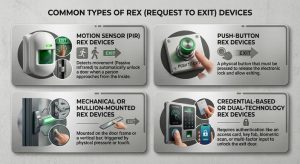
REX devices come in four main flavors — motion sensor, push-button, mechanical/mullion-mounted, and credential-based — each suited to different doors, traffic patterns, and life safety requirements.
Key Factors When Choosing REX Devices
- Life safety and fire code compliance. Many jurisdictions require free egress on designated fire and life safety doors, meaning occupants must be able to leave without a key, card, or button press. This alone rules out push-button REX devices for those specific openings.
- Fail-safe vs. fail-secure locking. REX devices must be matched to the door’s lock hardware. A fail-safe electric strike behaves differently during a power failure than a fail-secure maglock, and your REX devices need to be wired and programmed accordingly to avoid trapping occupants or leaving a door unsecured.
- False alarm and tailgating risk. High-traffic doors — lobbies, break rooms, warehouse docks — need REX devices with tighter detection zones or dual-technology sensing to avoid a flood of nuisance alerts or unauthorized tailgating through a “held open for exit” window.
- Environmental conditions. Outdoor doors, loading docks, and doors near HVAC vents can trigger motion-based REX devices unpredictably. In these environments, mechanical or push-button REX devices are often more dependable.
- Integration with your access control panel. Confirm that any REX devices you choose are compatible with your panel’s supervised inputs, wiring requirements, and reporting format — this matters most when retrofitting REX devices into an older system.
Best Practices for Installing REX Devices

Technicians run low voltage wiring above a commercial exit door while fitting electric strike hardware into the frame — a typical step in upgrading a building’s access control system.
Work with your AHJ (authority having jurisdiction) early, since life safety inspectors often have specific opinions on acceptable REX devices for fire doors. Test detection zones after installation — a REX device aimed too broadly can pick up people walking past the door rather than through it. Label and document every REX device in your system so future service calls don’t turn into guesswork, and schedule periodic testing, since dust, vibration, and wear can shift sensor performance over time.
Bringing It All Together
Choosing the right REX devices isn’t about picking the newest or cheapest sensor on the shelf — it’s about matching the device to the door, the code requirements, and the traffic pattern it will see every day. Take the time to evaluate each opening individually, loop in your local fire marshal when free egress is required, and your access control system will reward you with fewer false alarms and a safer, smoother exit experience for everyone who uses the building.
For help with any project or installation in the New Jersey or Philadelphia area please call us at 877-832-1206.
For more ideas please visit – https://www.bridgecable.com/services/
For more information and educational content please visit:
https://www.youtube.com/@BridgeCable
Copyright © 2026 Bridge Cable. All rights reserved.
Mailing: 2745 Terwood Road, Willow Grove, PA 19090
Warehouse: 2066 W. Hunting Park Ave, STE 308, Philadelphia, PA 19140
Related Posts

Why Does Access Control During a Power Outage Matter?

Smart Crates for Animals and Bridge Cable